Face matching is a central control in remote identity verification, but stronger security does not require a longer or more demanding user journey. Many failed comparisons are caused by preventable capture problems, weak reference images, poorly calibrated thresholds, or workflows that treat every uncertain result as a rejection.
Businesses can improve face-match accuracy by optimizing image quality, providing real-time capture guidance, applying validated thresholds, and combining facial similarity with liveness, device, document, and session evidence. FinAuth supports this layered approach so legitimate users can recover from correctable issues while higher-risk sessions receive proportionate verification.
1. Understand What Face Match Accuracy Means
In 1:1 Face Verification, the system compares a fresh facial capture with a trusted reference portrait, such as an image extracted from an identity document. The resulting similarity score indicates how strongly the two images appear to represent the same person.
Two error measures are particularly important:
False Match Rate (FMR): The proportion of comparisons between different people that are incorrectly accepted.
False Non-Match Rate (FNMR): The proportion of comparisons involving the same person that fail to reach the required threshold.
A stricter threshold can reduce false matches but increase false non-matches. Improving accuracy therefore requires more than raising the threshold. The workflow must improve the quality of the comparison and route uncertain cases appropriately.
2. Improve Capture Quality Before Adding More Steps
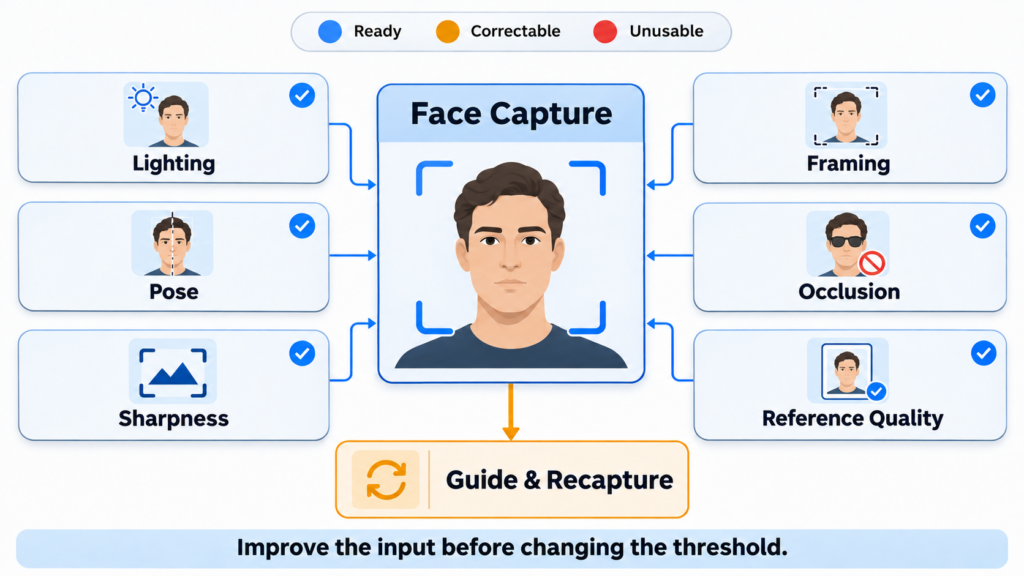
Poor facial capture quality is a major source of failed verification. Blur, shadows, overexposure, low resolution, extreme angles, facial obstruction, and incorrect distance can reduce the usable facial information available to the matching model.
The verification interface should identify these issues before submission and provide specific guidance:
- Move closer or farther from the camera.
- Face the camera directly.
- Improve lighting without creating glare.
- Remove avoidable facial obstructions.
- Hold still while the image is captured.
- Ensure only one face appears in the frame.
FinAuth can evaluate capture quality in real time and request correction before an unusable image reaches the comparison stage. This avoids unnecessary backend failures and helps users complete verification within the same session.
3. Evaluate the Reference Image as Well as the Live Capture
A clear live image cannot fully compensate for a weak reference portrait.
Document portraits may be old, compressed, damaged, poorly illuminated, partially covered by security features, or captured from a low-quality document image. Appearance changes caused by aging, facial hair, glasses, cosmetics, or medical conditions may also affect comparison performance.
FinAuth can assess both sides of the comparison:
Live image quality: Pose, lighting, sharpness, visibility, framing, and resolution.
Reference quality: Portrait size, document capture quality, compression, glare, damage, and extraction confidence.
If the live capture is weak, the system can guide the user to retry it. If the reference portrait is unreliable, repeatedly requesting another selfie may not solve the problem. The workflow may instead request a better document capture or another trusted identity source.
4. Use Guided Recapture Instead of Generic Failure Messages
Generic messages such as “Verification failed” create unnecessary abandonment because users do not know what to correct.
A better recovery workflow identifies the specific problem and preserves completed steps. For example:
- Blur triggers a steady-camera instruction.
- Poor lighting triggers exposure guidance.
- Incorrect pose triggers a framing correction.
- Document glare triggers document recapture rather than another selfie.
- A temporary connection issue allows the session to resume.
- Repeated quality failures can route to an alternative verification method.
The number of retries should remain controlled. Repeated attempts without improvement may indicate an unsupported device, accessibility issue, or elevated fraud risk rather than ordinary user error.
5. Calibrate Thresholds with Representative Data
A face-match score is not universal. Score ranges and recommended thresholds vary by algorithm, operating environment, capture source, and required security level.
Thresholds should be calibrated using representative production data covering:
- Supported devices and cameras
- Document types and markets
- Expected user populations
- Realistic lighting and capture conditions
- Genuine comparisons and relevant attack samples
- Required FMR and acceptable FNMR
- Recapture, abandonment, and review rates
Thresholds should not be adjusted by demographic group. Instead, businesses should test whether the selected model and capture process provide consistent performance across the expected population and correct operational weaknesses that create unequal image quality.
6. Use Decision Bands Instead of One Pass-or-Fail Boundary
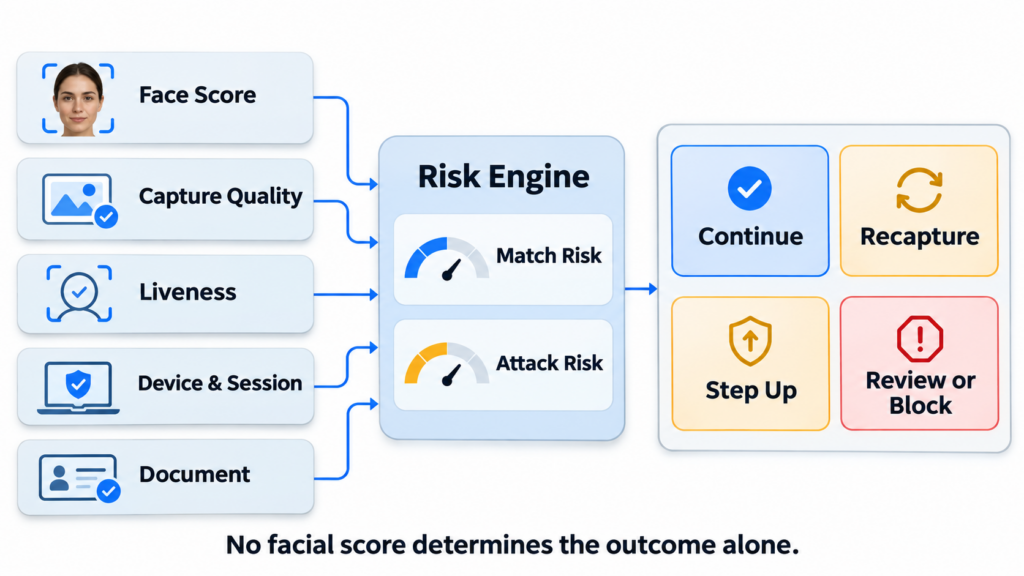
A single threshold forces borderline scores into an immediate acceptance or rejection. Decision bands create safer recovery paths.
Strong match: Continue when facial similarity, liveness, document, and session evidence are trusted.
Borderline match: Request a guided recapture when quality is the likely cause.
Uncertain identity: Apply stronger liveness, another document check, or supplementary evidence.
High risk: Review or block when weak similarity overlaps with injection, spoofing, document manipulation, device anomalies, or linked fraud indicators.
FinAuth’s Risk Engine can combine the face-match result with capture quality, document authenticity, Edge or Cloud Liveness Detection, injection detection, device intelligence, and session context. No individual score determines the outcome alone.
7. Separate Facial Similarity from Genuine Presence
A high similarity score means that two facial images look alike. It does not confirm that the applicant is physically present or that the camera stream is trustworthy.
Attackers may use:
- Printed photographs
- Screen replays
- Masks
- Real-time face swaps
- Virtual cameras
- Injected images or video
Face Verification should therefore operate alongside Liveness Detection and capture-integrity controls. FinAuth can evaluate presentation attacks, media injection, camera integrity, device conditions, and facial similarity as separate but complementary signals.
This layered structure improves security without requiring every legitimate user to perform a longer active challenge.
8. Measure Accuracy and Conversion Together
Optimizing only the face-match pass rate can hide fraud exposure. Optimizing only for low false matches can increase genuine-user rejection.
Teams should monitor:
- FMR and FNMR at each threshold
- First-attempt and eventual completion rates
- Quality-failure and recapture rates
- Abandonment by verification stage
- Manual-review volume
- Confirmed fraud by score band
- Performance by device, market, document, and capture condition
- Liveness and injection-detection outcomes
These metrics reveal whether failures come from the matching model, capture experience, reference portrait, threshold configuration, or surrounding risk rules.
9. Face Match Accuracy Q&A
Can a higher threshold always improve face verification security?
No. A higher threshold may reduce false matches but increase genuine-user rejection. Security should be improved through calibrated thresholds, better capture quality, liveness, injection detection, and contextual risk analysis.
How can businesses reduce face-match retries?
They can detect quality problems before submission, provide specific capture guidance, evaluate the reference portrait, and request the correct recovery action instead of repeating the same comparison.
Should every borderline score require manual review?
No. A quality-related borderline result may be resolved through guided recapture. Manual review or stronger verification is more appropriate when uncertainty overlaps with additional risk indicators.
How does FinAuth improve accuracy without adding friction?
FinAuth combines real-time quality checks, guided recovery, Face Verification, Edge and Cloud Liveness Detection, injection detection, device intelligence, and risk-based decisioning. Trusted users can continue efficiently while uncertain sessions receive targeted verification.
10. Conclusion
Improving face-match accuracy does not require making every user complete more steps. The strongest approach improves the images entering the comparison, calibrates thresholds with representative data, and gives uncertain sessions an appropriate recovery path.
By combining facial similarity with quality, liveness, capture integrity, document, device, and session evidence, FinAuth helps businesses reduce false rejection while maintaining strong protection against impersonation and synthetic-media attacks.