

# Encrption Guide
# 1.1 Overview of encryption scheme
In order to protect the user's sensitive information from being leaked, when calling the verify and liveness interfaces, FinAuth encrypts the strings and images involving user information in the parameters and return values passed in the interface. The encryption rules are as follows:
a. Encryption of parameters passed through the interface
Encryption method
FinAuth generates a key pair and provides the public key in the console. The application uses the public key to encrypt the parameters when adjusting the interface, and FinAuth uses the private key to decrypt.
Encrypted content
| interface | Encryption parameters | illustrate |
|---|---|---|
| compare | image | User-owned photos passed in |
| image_ref | Reference face photo provided by the application |
# 1.2 How to enable encryption
Encryption is configured through the encryption_type field, and the encryption supported RSA encryption method is configured through the following rules:
- When encryption_type is configured as "0", encryption is not enabled;
- When encryption_type is configured as "2", RSA encryption is used.
# 2 Key configuration
# 2.1 How to generate a key
# RSA generate key
RSA encryption and decryption uses a 1024bit key, and padding uses PKCS#1.
Public and private key generation
The public and private keys must be in standard PEM format, refer to the generation based on openssl https://blog.csdn.net/aa464971/article/details/51035200
Example
Public key:
-----BEGIN PUBLIC KEY-----
MIGfMA0GCSqGSIb3DQEBAQUAA4GNADCBiQKBgQCBSc4iLjnf7CQsF7KrmmXWXMDA
xPZbXIxf0Gdf5QsoBTOgwzSTIUgbdh7srEFrq3f2wjcpRuFHhhRNP1UujQM3onXi
La9SyckZluJhlFHmurY9P3YVnnXdtw4tMDHIkWhFIygArN4dYkbQdNw4HUMvKixu
JIZfGkDfBqT+0p2FfwIDAQAB
-----END PUBLIC KEY-----
Private key:
-----BEGIN RSA PRIVATE KEY-----
MIICWwIBAAKBgQCBSc4iLjnf7CQsF7KrmmXWXMDAxPZbXIxf0Gdf5QsoBTOgwzST
IUgbdh7srEFrq3f2wjcpRuFHhhRNP1UujQM3onXiLa9SyckZluJhlFHmurY9P3YV
nnXdtw4tMDHIkWhFIygArN4dYkbQdNw4HUMvKixuJIZfGkDfBqT+0p2FfwIDAQAB
AoGABkxRyZPPIGLWLgrOYbXjqTowmSxNWcXKDpW4vFfv7fhiArARewgIWuDH3Rk4
a4X89YQ8wFc7Q8PsqQjocw34nNtea+qGZWFV1EQ/aaVpYrgCDjNAx9QTcPgVbq3/
QMdWoLAzdaOao7glo5VxG5+WQYJs1mjtPJdT2p1kSngol8kCQQCEyVKhz0S6N4dY
1yBaYFV/dK8HvdpxSPkfOHC3KePIkpv12vuGKjVTHm2PtMvm83UA4hwzEIAHATqS
6q/ilNCDAkEA+UGGRFCb2igRm6pKgaVKYJsAE1xtySJnGD5mDPr724ewzvQ4zdVv
JWcvX41jVf6rLt3b1qKcDm2u2QLMmTRuVQJAZWlsVm/5yU6Ha+5Ao0VXhtQSqRLy
NfrJaHKugvTXJmPyAL6RwlGSEDz45/vojiX5ggcuCkHbxX3GwlXCpoWJCQJAD0kQ
ZdIXrKo2YjhwN0EerYvz1jwd027Tqa3x7ivaFB1fH2HkteK33TBVvGNcSyLB9q7O
U3xHW68oQNCmIWMQvQJAVdDBEf3y65l/k2Ian3mJdpZT7JGOBjGbnoXNidVv8T+J
FlJtfbj7eoZne5bM1IDXDgPlYt36vFuPKvb89YvhCw==
-----END RSA PRIVATE KEY-----
# 2.2 How to upload the key
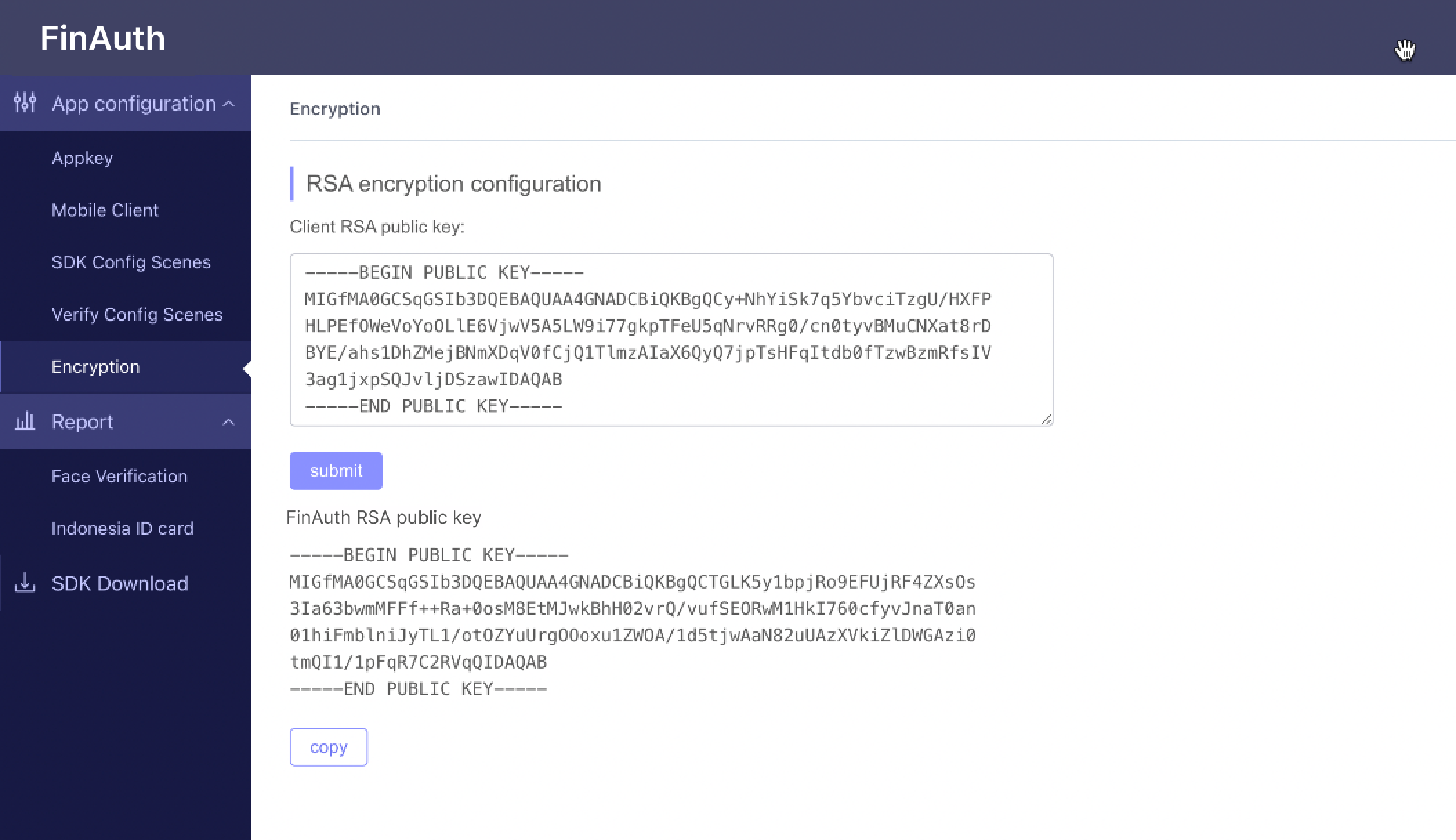
In the configuration of the console, click Information Encryption, fill in the generated key into the RSA encryption configuration, and then click Submit. The FinAuth RSA public key is displayed below the submit button, indicating that the upload is successful
# 3 Encryption and decryption examples
# 3.1 Image encryption
# a. Encrypted object
| interface | Encryption parameters | illustrate |
|---|---|---|
| compare | image | User-owned photos passed in |
| image_ref | Reference face photo provided by the application | |
| liveness | image_ref | Reference face photo provided by the application |
# b. Encryption instructions
The process of generating encrypted images is as follows:
- Calculate picture len;
- If len<=1024, encrypt the full text of the image. Use the public key to encrypt. After encryption, the string length int (len) is generated. len is converted into 4 bytes and added to the end of the file. Base64 encode the encrypted string to generate the final encrypted image data;
- If len > 1024, only the first 1024 bytes of data are encrypted. The data after 1024 bytes are not encrypted and are directly spliced after the encrypted string. The encryption method is the same as above. Please note: the 4 bytes converted by len should be added to the end of the entire file instead of the end of the encrypted string.
# c. Specific methods
ENC is the encryption method. If the RSA method is used, ENC is RSA.en
len<=1024: original image data ---→data1 after ENC encryption---→ data1+len(data1) ----→Base64(data1+len(data1))
len>1024: original image data ---→data[1024] ENC encrypted data1---→ data1+unencrypted content data2+len(data1) ----→Base64(data1+data2+len(data1))
# d. Example formula (len>1024)
en_data = ENC(image[1024]) // Encrypt 1024 bytes
Base64.en(en_data+plain_data+len(en_data)); // Base64 encryption result
# 4 Encryption and decryption sample code
Please contact FinAuth customer support or your business representative for assistance.