Customer due diligence is essential for verifying customer identity, identifying potential fraud, and supporting regulatory compliance. However, traditional CDD workflows often rely on disconnected tools, repeated data entry, and manual review. These inefficiencies increase onboarding costs and cause legitimate applicants to abandon the process.
CDD automation connects identity verification, document analysis, biometric checks, device intelligence, and risk decisioning within one digital workflow. With FinAuth, businesses can automate routine checks while routing uncertain or high-risk cases to stronger verification or human review.
1. What Is an Automated CDD Workflow?
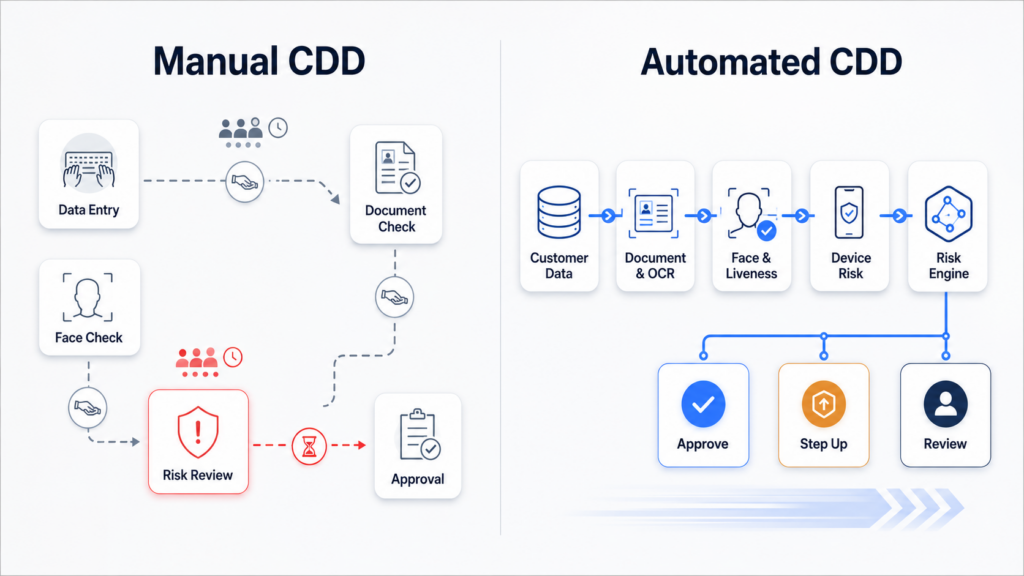
An automated CDD workflow collects customer information, validates identity evidence, assesses risk, and determines the appropriate onboarding action with limited manual intervention.
A typical workflow includes:
- Customer data collection
- Identity document capture
- OCR data extraction
- Document authenticity checks
- Face matching and liveness detection
- Device and session analysis
- Risk scoring
- Approval, step-up verification, or manual review
Automation does not eliminate human judgment. It allows compliance teams to focus their attention on exceptions instead of manually processing every customer.
2. Why Manual CDD Slows Digital Onboarding
Manual CDD creates delays because customer data must often move between onboarding forms, document verification systems, biometric tools, compliance databases, and internal review teams.
Common problems include inconsistent data entry, repeated checks, unclear review criteria, and high false-positive rates. When every applicant follows the same process, low-risk customers face unnecessary friction while genuinely suspicious cases may not receive enough scrutiny.
A risk-based platform such as FinAuth brings document, facial, device, session, and behavioral signals into a unified decision workflow. This reduces operational fragmentation and supports more consistent outcomes.
3. How to Automate CDD Step by Step
3.1 Capture Customer Information
The process begins by collecting the identity details required for the customer type, product, and jurisdiction. Guided capture should help users submit readable identity documents and complete information correctly the first time.
FinAuth provides identity document capture through mobile and web SDKs, helping detect issues such as blur, glare, obstruction, incorrect orientation, and incomplete framing before the document moves deeper into the workflow.
3.2 Extract and Validate Identity Data
Multilingual OCR extracts fields such as name, date of birth, document number, address, nationality, and expiry date. The extracted information can then be compared with user-submitted data and machine-readable zones.
FinAuth combines OCR with document verification to evaluate document structure, visual consistency, validity, and signs of manipulation. Its Large Visual Model-based analysis can help identify risks such as Photoshop traces, splicing, recapture, screen display, and screenshots.
3.3 Verify the Person Behind the Document
Document verification alone cannot confirm that the applicant is the legitimate document holder. Face verification compares a fresh facial capture with the portrait extracted from the identity document.
FinAuth adds Edge and Cloud liveness detection to resist printed photos, replay attacks, 2D and 3D masks, deepfakes, and virtual-camera injection. Combining face match and liveness results makes it harder for attackers to submit stolen or synthetic identities.
3.4 Evaluate Device and Session Risk
CDD automation should assess more than the document and face. Device fingerprints, proxy or VPN use, emulators, IP reputation, geolocation, timezone, user agent, and repeated registration behavior can reveal risks that identity evidence alone may miss.
FinAuth connects these signals with behavioral indicators such as input cadence and interaction paths. A genuine-looking document may therefore receive additional scrutiny when it appears within a suspicious device or session environment.
3.5 Apply Risk-Based Decisioning
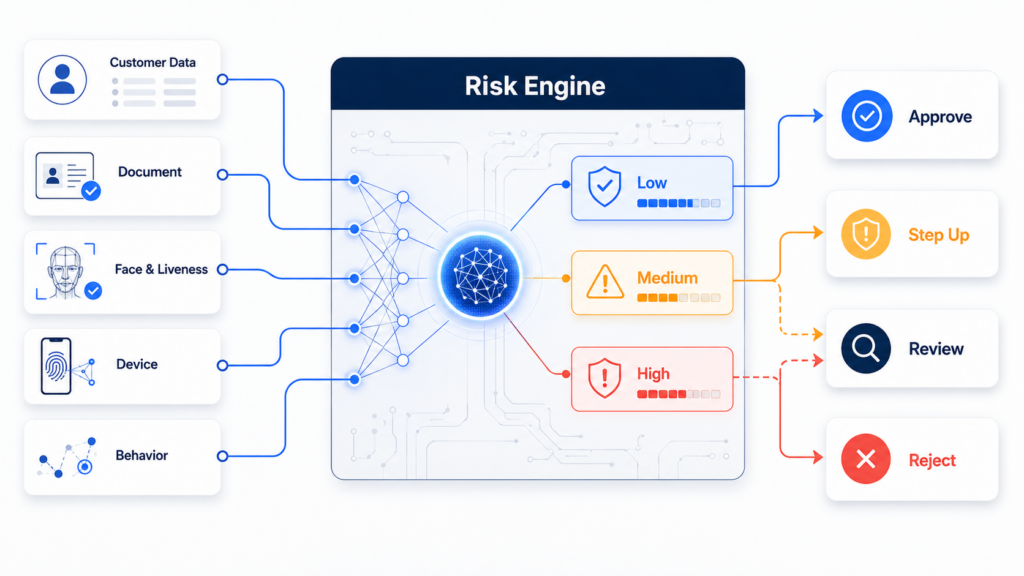
All verification results should enter a centralized risk engine rather than operating as isolated pass-or-fail checks.
FinAuth combines configurable rules and machine learning to classify sessions into different risk levels. A low-risk applicant may be approved automatically, a medium-risk applicant may receive an additional face or document check, and a high-risk case may be reviewed or rejected.
4. Build Exception Handling Into the Workflow
A fully automated approval rate should not be the only objective. The workflow must also explain why a case was escalated and provide reviewers with the necessary evidence.
Businesses should define clear triggers for document recapture, biometric retry, enhanced verification, manual review, and rejection. FinAuth maintains verification results, risk signals, and decision records to support investigation and compliance auditing.
Rules should also be tested and refined over time. Whitelists, threshold configuration, and A/B testing can help businesses balance fraud prevention, compliance requirements, and customer conversion.
5. Integrate CDD With the Wider Compliance Stack
Identity verification is one component of customer due diligence. Automated CDD workflows may also need to connect with sanctions screening, politically exposed person checks, adverse media tools, customer risk classification, and ongoing transaction monitoring.
FinAuth can serve as the identity verification and fraud risk layer within this wider architecture. SDKs and REST APIs allow verification results to flow into onboarding, compliance, and case-management systems, while private, hybrid, and edge deployment options support different data governance requirements.
6. Frequently Asked Questions
6.1 Can CDD be fully automated?
Many routine identity checks and low-risk onboarding decisions can be automated. Complex ownership structures, data inconsistencies, or high-risk applicants may still require compliance review.
6.2 How does FinAuth accelerate customer onboarding?
FinAuth unifies document capture, multilingual OCR, document verification, face matching, liveness detection, device intelligence, behavioral analysis, and risk decisioning. This reduces system handoffs and allows trusted customers to follow a faster path.
6.3 What is the difference between CDD automation and KYC automation?
KYC automation commonly focuses on collecting and verifying identity information. CDD automation is broader and uses identity, risk, and compliance information to determine the appropriate level of customer scrutiny.
6.4 Does faster onboarding create more fraud risk?
Not when speed comes from risk-based orchestration. By combining identity verification with device, session, behavioral, and fraud intelligence, businesses can reduce friction for legitimate customers while applying stronger controls to suspicious sessions.
7. Automate Decisions, Not Just Individual Checks
The main value of CDD automation does not come from adding another verification API. It comes from connecting customer data, identity evidence, biometric checks, fraud signals, and compliance rules into one coordinated workflow.
FinAuth helps digital businesses build this end-to-end identity and risk layer, enabling faster onboarding for trusted customers, proportionate verification for uncertain cases, and traceable decisions for compliance teams.