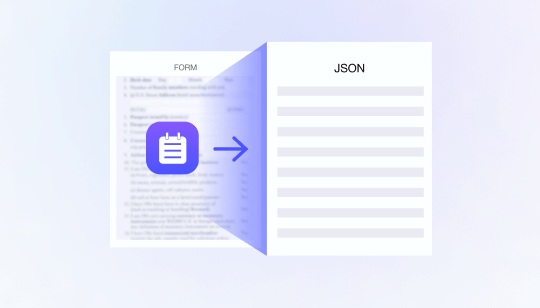
Proof of address checks are a common part of KYC and customer due diligence. However, manually reviewing utility bills, bank statements, government letters, and similar documents creates delays and inconsistent decisions during digital onboarding.
Address document OCR converts these documents into structured data that can be validated automatically. When combined with document quality analysis, cross-field comparison, fraud detection, and risk-based decisioning, it enables businesses to process straightforward cases faster while escalating uncertain documents for additional verification.
1. What Is Address Document OCR?
Address document OCR uses optical character recognition to identify and extract information from documents submitted as proof of residence.
Depending on the document type and local KYC requirements, the workflow may extract:
- Customer name
- Residential address
- Document issuer
- Issue or statement date
- Account or reference number
- Country and postal code
- Document type
The output is converted into structured fields that can be compared with the customer’s application, identity document, and existing profile. This removes the need for compliance teams to locate and type every field manually.
OCR alone, however, does not prove that the document is valid or that the address belongs to the applicant. It is the first step in a broader proof of address verification workflow.
2. Why Manual Proof of Address Checks Create Friction
Address documents vary widely in layout, language, date format, image quality, and field placement. Even documents issued by the same organization may have different templates or digital and paper versions.
Manual processing can therefore create several operational problems:
- Slow data entry and document review
- Inconsistent interpretation of address formats
- Missed expiry or recency requirements
- Difficulty detecting edited fields
- Repeated requests for document resubmission
- Limited traceability of review decisions
Automation standardizes how information is extracted and evaluated. Instead of reviewing every submission with the same level of effort, businesses can approve consistent low-risk documents and focus manual resources on mismatches and fraud indicators.
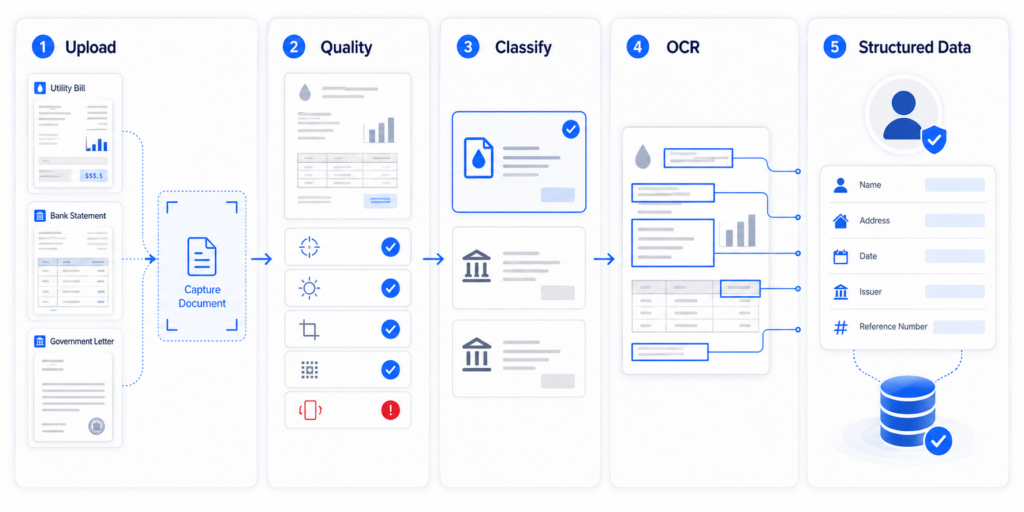
3. How to Automate Address Document Data Extraction
3.1 Perform Capture and Quality Checks
The system should first determine whether the uploaded document is usable. Blur, glare, obstruction, incomplete cropping, low resolution, and incorrect orientation may prevent reliable extraction.
A guided capture workflow can detect these problems early and request a better image before the customer leaves the onboarding session. This reduces downstream OCR errors and unnecessary compliance review.
3.2 Identify the Document Type
Before extracting data, the system should identify whether the submission is a utility bill, bank statement, tax document, government letter, or another accepted proof of address.
Document classification helps the OCR engine locate the relevant fields and apply the correct validation rules. For example, a bank statement and an electricity bill may display the customer address, issuer, and date in very different locations.
3.3 Extract and Standardize Address Data
OCR identifies relevant text regions and converts them into machine-readable fields. The extracted address should then be standardized to reduce superficial differences caused by capitalization, abbreviations, punctuation, or field order.
For multilingual onboarding, the workflow must also handle different scripts, address structures, and date formats. FinAuth uses multilingual document processing and Large Visual Model capabilities to understand document structure instead of treating every page as an unorganized block of text.
3.4 Validate the Extracted Information
The system should compare the OCR results with other available customer information, including:
- The address entered in the application
- The name shown on the identity document
- Existing customer profile information
- Country and postal-code formats
- The required document recency period
Small formatting differences should not automatically cause rejection. However, a different customer name, conflicting country, invalid date, or substantially different address may require recapture or manual review.
3.5 Analyze Document Authenticity and Fraud Risk
A document can contain readable information and still be fraudulent. Attackers may edit the name, replace the address, alter the date, combine content from multiple documents, or submit a screenshot or recaptured image.
FinAuth combines OCR results with visual document analysis to identify Photoshop traces, splicing, recapture, screen display, screenshots, and other manipulation risks. Device, session, and behavioral signals can provide additional context when a visually convincing document is submitted through a suspicious environment.
4. Use Risk-Based Decisioning Instead of Simple Matching
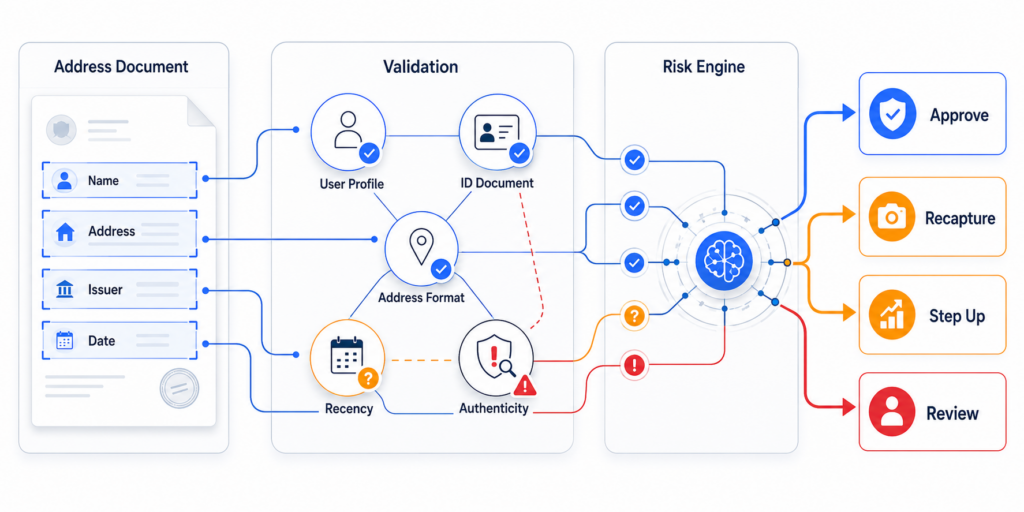
A proof of address workflow should not rely on a single exact-match rule. All extraction, consistency, authenticity, device, and customer-risk signals should enter a centralized risk engine.
FinAuth can use configurable rules and machine learning to route cases into proportionate outcomes:
- Approve: Information is readable, consistent, recent, and low risk.
- Recapture: Image quality is insufficient for reliable extraction.
- Step Up: Additional identity or address evidence is required.
- Review: Important fields conflict or fraud indicators are present.
- Reject: The document shows strong evidence of manipulation or unacceptable risk.
This approach reduces false rejections caused by minor formatting differences while maintaining stronger controls for suspicious submissions.
5. Connect Address Verification With the Full KYC Workflow
Proof of address should not operate as an isolated document check. Its results should be evaluated alongside identity document verification, face matching, liveness detection, customer profile data, and ongoing risk signals.
FinAuth provides an end-to-end identity verification and risk layer that can connect document processing with biometric verification, device intelligence, behavioral analysis, and decision policies. SDK and REST API integration allows structured address results and risk decisions to flow into onboarding, CDD, and case-management systems.
Complete logs should record the submitted document, extracted data, field comparisons, risk indicators, and final decision. This creates a traceable review process and helps compliance teams refine thresholds over time.
6. Frequently Asked Questions
6.1 Can OCR verify a customer’s address by itself?
No. OCR extracts address information, but verification also requires consistency checks, document authenticity analysis, recency validation, and risk assessment.
6.2 What documents can be used as proof of address?
Common examples include utility bills, bank statements, government correspondence, and tax documents. Accepted document types and recency requirements depend on the business, product, and jurisdiction.
6.3 How does FinAuth automate proof of address checks?
FinAuth combines document capture, multilingual OCR, visual fraud detection, cross-field validation, device intelligence, and risk-based decisioning. Consistent cases can move through a faster path, while uncertain documents are routed to recapture, step-up verification, or review.
7. From Data Extraction to Reliable Address Decisions
Address document OCR can significantly reduce manual data entry, but automation should not stop at text extraction. Effective proof of address checks require document classification, data standardization, cross-source validation, fraud detection, and explainable risk decisions.
By integrating these capabilities into the wider FinAuth eKYC workflow, businesses can accelerate digital onboarding while maintaining consistent identity verification and compliance controls.