Digital financial services allow customers to open accounts, apply for loans, activate wallets, and access payment products without visiting a physical branch. To support these journeys securely, financial institutions need to verify that each applicant is real, that the identity document is legitimate, and that the person completing the process is the document owner.
Remote identity verification combines document analysis, facial recognition, liveness detection, device intelligence, and risk-based decisioning into one digital workflow. When designed correctly, it can reduce onboarding time while strengthening fraud prevention and compliance controls.
What Is Remote Identity Verification?
Remote identity verification is the process of confirming a customer’s identity through digital channels instead of an in-person inspection.
A typical process asks the customer to capture an identity document and a live facial image. The system then extracts identity information, evaluates document authenticity, compares the customer’s face with the document portrait, and checks whether the biometric sample comes from a real person present during the session.
Additional signals—such as device configuration, IP address, location, network environment, and user behavior—can be evaluated before the platform makes a final decision.
Remote verification is commonly used for:
- Digital bank account opening
- Mobile wallet registration
- Consumer and business lending
- Payment account activation
- Insurance applications
- Account recovery and password resets
- Sensitive profile changes
- High-value transactions
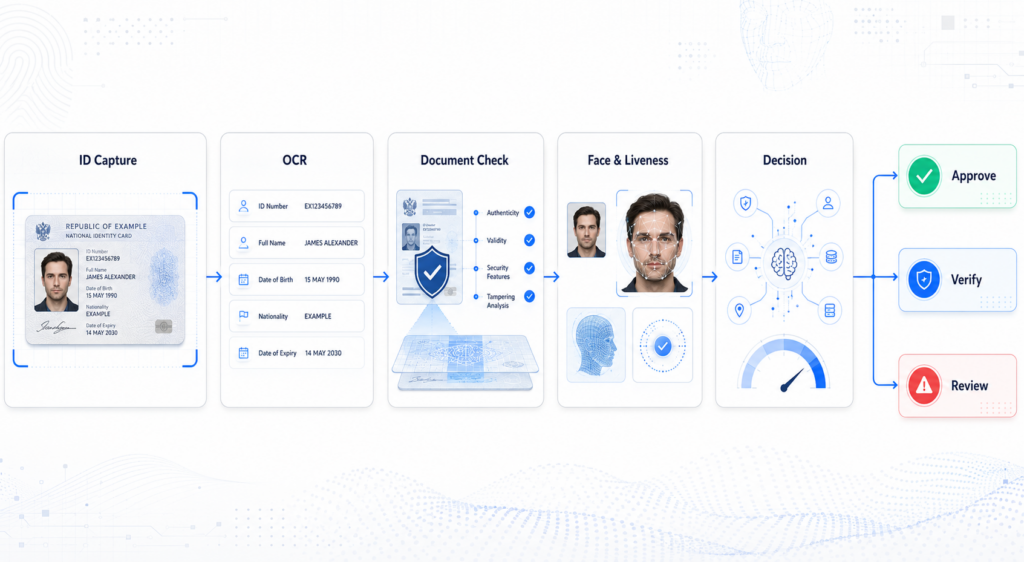
Step 1: Document Capture
The process begins with the customer capturing a government-issued identity document. Depending on the market and use case, this may include a national ID card, passport, driving licence, or residence permit.
A capture SDK can guide the user to position the document correctly and check whether the image is clear enough for analysis. Common quality checks include blur, glare, obstruction, cropping, low resolution, and incomplete document edges.
Automatic capture helps reduce user errors by taking the image only when the document is properly positioned. If the image fails the quality requirements, the customer can be asked to recapture it before the workflow continues.
Step 2: OCR and Data Extraction
Optical character recognition converts the document image into structured customer data. The system can extract fields such as:
- Full name
- Date of birth
- Document number
- Nationality
- Expiry date
- Address
- Machine-readable zone data
The extracted information can automatically populate the onboarding form, reducing manual input and improving consistency.
However, OCR only determines what information appears on the document. It does not establish whether the document itself is genuine. This requires a separate authenticity analysis.
Step 3: Document Authenticity Verification
Document verification examines whether the submitted document shows signs of fraud or manipulation.
The system may evaluate layout, fonts, field positions, security patterns, portrait regions, image compression, and consistency between different document fields. It can also look for evidence of digital editing, data replacement, document splicing, screenshots, printed copies, screen recapture, or re-photographed images.
Cross-field validation helps identify inconsistencies. For example, the date of birth may conflict with the document number, the front and back images may contain different information, or the machine-readable zone may not match the visible text.
This stage helps distinguish a readable document from a trustworthy one.
Step 4: Face Matching and Liveness Detection
After the document is checked, the customer captures a selfie or short facial video. Face verification compares the live facial image with the portrait extracted from the identity document.
The system generates a similarity score and determines whether both images are likely to represent the same person.
Liveness detection adds another security layer by assessing whether the biometric sample comes from a real person present during the session. It can help detect printed photos, replayed videos, masks, deepfakes, face swaps, virtual cameras, and injected media streams.
Passive liveness can operate without requiring the user to perform specific actions, reducing onboarding friction. Higher-risk sessions may be routed to stronger active checks or additional verification.
Step 5: Device and Session Risk Analysis
A genuine-looking document and face may still be submitted through a suspicious environment. Device and session intelligence provide additional context about how the verification is being performed.
Relevant signals may include:
- Device fingerprint
- Emulator or virtual machine usage
- Proxy or VPN connections
- IP reputation
- Geographic location
- Timezone and language consistency
- Operating system and browser information
- Repeated verification attempts
- Multiple identities linked to one device
These signals can reveal organized fraud, account farming, automation, or attempts to bypass normal capture controls.
Step 6: Behavioral Risk Analysis
The customer’s interaction with the verification process can also indicate risk. Behavioral analysis may evaluate navigation patterns, typing rhythm, touch activity, capture timing, repeated corrections, and unusually rapid form completion.
A single unusual action may not be meaningful. When combined with document, biometric, and device anomalies, however, behavioral signals can help identify coordinated or automated fraud.
Step 7: Risk-Based Decisioning
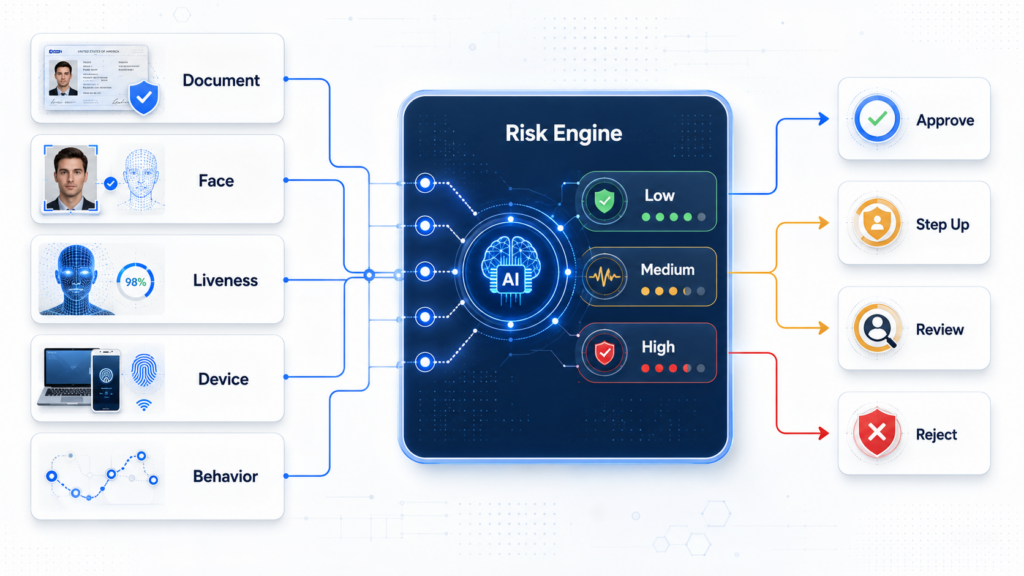
The final decision should not depend on one verification result alone. A risk engine combines document, face, liveness, device, session, behavior, and business-rule signals into a unified assessment.
The platform can then route the customer according to the overall risk level:
- Low risk: Approve automatically
- Medium risk: Request additional verification
- High risk: Route to manual review
- Critical risk: Reject or block the session
Risk-based orchestration allows financial institutions to maintain a smooth experience for legitimate customers while applying stronger controls to suspicious cases.
Security and Compliance Considerations
Remote verification processes handle sensitive identity and biometric information. Businesses should apply encryption, access controls, data-minimization policies, retention rules, and full-session audit logging.
Verification evidence should record what information was submitted, which checks were performed, what risks were detected, and how the final decision was reached. This creates a traceable record for compliance reviews, fraud investigations, and policy optimization.
Deployment models should also reflect regional data requirements. Depending on the market, financial institutions may use public cloud, private cloud, hybrid, or on-premises architectures.
Balancing Security and Customer Conversion
Adding more verification steps does not automatically create better security. Excessive friction can increase abandonment, while weak controls can expose the platform to identity fraud.
An effective workflow applies fast, passive checks by default and introduces additional steps only when risk signals justify them. Real-time capture guidance, automated data extraction, passive liveness, and configurable decision rules can reduce unnecessary customer effort.
Performance should be monitored continuously across approval rates, completion time, recapture rates, false rejections, manual-review volume, and detected fraud.
Remote Identity Verification with FinAuth
FinAuth is a next-generation eKYC identity verification platform powered by advanced Large Visual Models. It combines document OCR and authenticity verification, face matching, Edge and Cloud liveness detection, injection attack detection, device and session intelligence, behavioral risk analysis, and configurable risk decisioning.
Through SDK and API integration, financial institutions can build end-to-end remote verification workflows for onboarding, account access, recovery, sensitive changes, and high-risk transactions.
Remote identity verification is not a single biometric check. It is a layered process that evaluates the document, person, device, session, and overall risk together—helping digital financial services improve security without sacrificing customer experience.