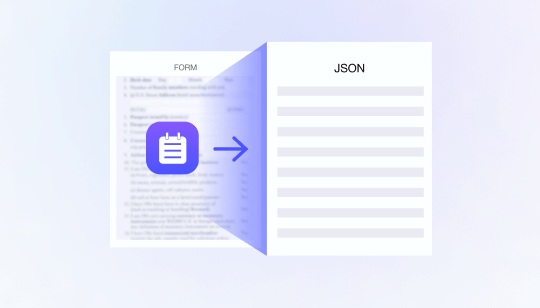
Digital onboarding often begins with a simple request: capture an identity document and provide personal information. Behind that step, however, businesses must process different document layouts, languages, image qualities, and data formats while keeping the customer journey fast and accurate.
Identity document OCR automates this process by converting document images into structured data. Instead of asking customers or operations teams to manually enter every field, an eKYC platform can extract the required information directly from the submitted document.
When combined with capture-quality checks, document authenticity analysis, face verification, and risk decisioning, ID OCR can improve onboarding efficiency without weakening identity controls.
What Is Identity Document OCR?
Optical character recognition identifies text inside an image and converts it into machine-readable information. Identity document OCR is optimized for passports, national identity cards, driving licences, residence permits, and other government-issued documents.
Unlike general-purpose OCR, an identity document solution must understand document structure. It needs to distinguish a name from an address, identify the document number, interpret date formats, and associate extracted values with the correct fields.
The output is usually returned as structured data through an API, allowing the onboarding platform to populate forms, run validation rules, and store approved identity information.
How Automated ID Data Extraction Works
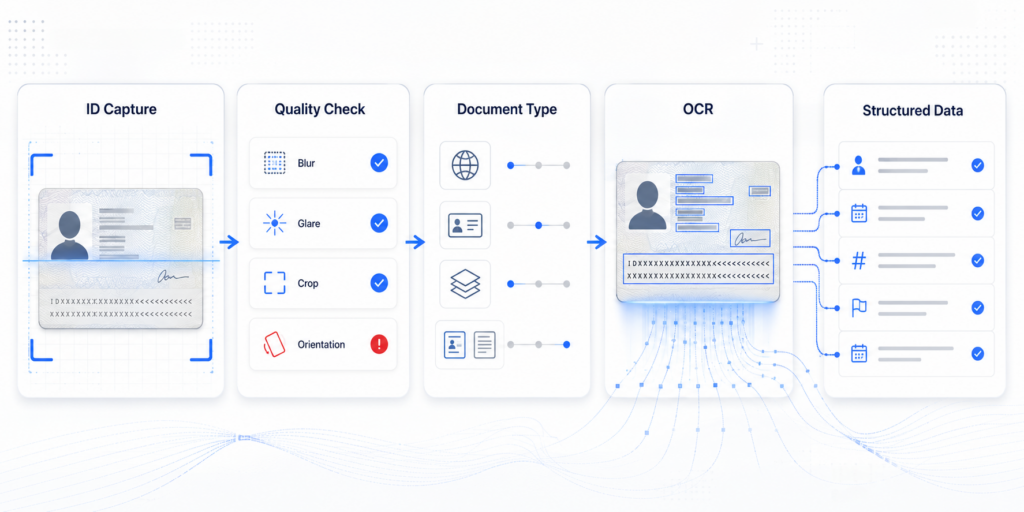
A typical ID OCR workflow contains several connected stages.
1. Document Capture
The customer captures the document through a web or mobile SDK. The system checks whether the document is fully visible and whether the image meets minimum quality requirements.
Relevant checks may include:
- Blur
- Glare and reflections
- Cropped document edges
- Low resolution
- Obstruction
- Poor lighting
- Incorrect document side
- Excessive perspective distortion
Real-time capture guidance can ask the customer to reposition or recapture the document before it reaches the OCR engine.
2. Image Preprocessing
The system improves the captured image for analysis. This may include document boundary detection, perspective correction, orientation adjustment, contrast enhancement, and separation of the document from the background.
Better preprocessing increases extraction accuracy and reduces the need for manual review.
3. Document Classification
Before extracting fields, the system identifies the document type, country, version, and side. This determines which layout and field structure should be expected.
For example, the position of a document number may differ between countries or document versions. The engine must understand the relevant template instead of treating every document as an unstructured page.
4. Field Extraction
The OCR engine detects text regions and maps the values to structured fields. Depending on the document, it may also read the machine-readable zone, barcode, or other encoded information.
5. Normalization and Validation
Extracted values are converted into consistent formats. Dates can be standardized, names can be separated into components, and address elements can be organized for downstream processing.
The platform can then apply format, consistency, and business-rule checks before accepting the information.
Common Identity Fields Extracted During eKYC
The required fields depend on the product, market, and regulatory framework. Common data elements include:
- Full name
- Given name and surname
- Date of birth
- Gender
- Nationality
- Residential address
- Document type
- Document number
- Issuing country or authority
- Issue date
- Expiry date
- Machine-readable zone data
- Document portrait
- Personal identification number
Businesses should extract only the information required for the relevant onboarding and compliance purpose. Collecting unnecessary identity data increases privacy and security exposure.
How ID OCR Improves Digital Onboarding
Faster Form Completion
Manual data entry creates friction, particularly when customers must type long document numbers or addresses. OCR can populate the onboarding form automatically, allowing the customer to review and confirm the information.
This reduces the number of steps and can shorten the time required to complete an application.
Fewer Input Errors
Customers may mistype names, dates, or identification numbers. OCR reduces dependence on manual entry and creates a direct connection between the submitted document and the application data.
The platform can still allow corrections, but sensitive changes should be logged and evaluated as potential risk signals.
Lower Operational Costs
Manual document transcription requires staff time and creates inconsistent results. Automated extraction allows operations teams to focus on exceptions, suspicious documents, and cases that require judgment.
Structured OCR output can also connect directly with customer databases, screening systems, lending workflows, and compliance tools.
Better Standardization
Documents from different markets use different layouts, languages, date formats, and address structures. A document-aware OCR engine can normalize these differences into a consistent data schema.
This makes it easier to operate one onboarding workflow across multiple countries while retaining document-specific validation rules.
Improved Customer Conversion
Capture guidance and automatic form population reduce avoidable onboarding failures. Customers can complete the process with fewer corrections, while businesses can identify unreadable images early instead of rejecting the application later.
OCR Is Not the Same as Document Verification
A readable document is not necessarily a genuine document.
OCR answers the question: What information appears on the document?
Document verification answers a different question: Can the document and its contents be trusted?
A forged, edited, re-photographed, or screen-displayed document may still contain clear text that OCR can extract successfully. Businesses should therefore avoid using extraction confidence as proof of document authenticity.
Document verification should examine elements such as document structure, font consistency, portrait regions, image manipulation traces, security features, screenshots, printouts, screen recapture, and front-back consistency.
Validating Extracted Identity Data
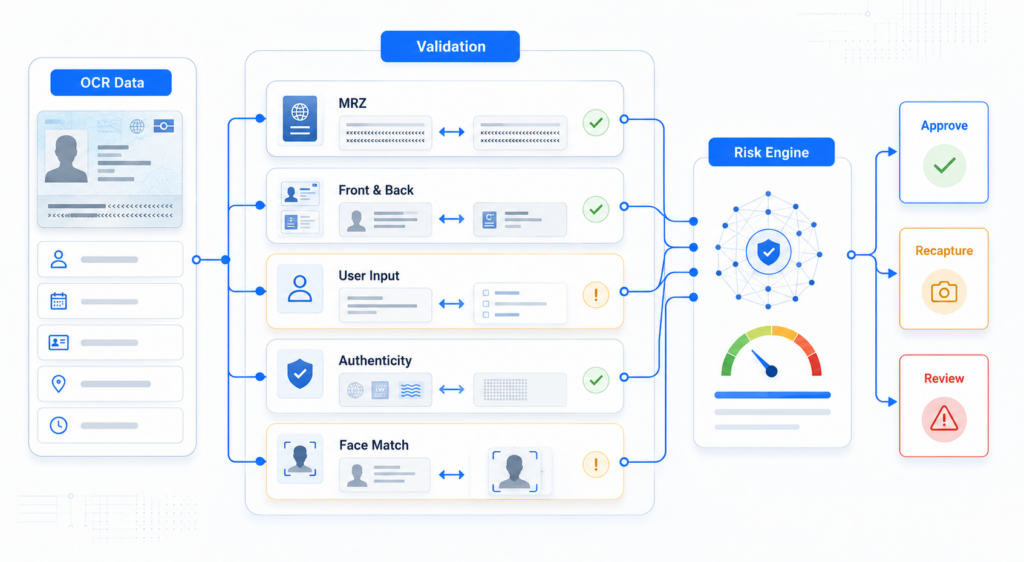
Extracted information becomes more valuable when it is checked across multiple sources.
Useful validation methods include:
- Comparing visible text with machine-readable zone data
- Checking consistency between the front and back of the document
- Validating document number and date formats
- Confirming that the document has not expired
- Comparing OCR results with customer-entered information
- Checking name and date of birth across supporting documents
- Matching the document portrait with a live facial capture
- Identifying repeated documents or identity numbers across accounts
A mismatch does not always mean fraud. OCR errors, transliteration differences, abbreviations, and regional address formats can create legitimate inconsistencies. The risk engine should evaluate the type, severity, and combination of mismatches before deciding whether to approve, recapture, or review the application.
Designing an Effective ID OCR Workflow
Businesses should evaluate OCR performance using the actual countries, document types, languages, and capture conditions of their customers. A high average accuracy rate may conceal weak performance on specific fields or underrepresented document versions.
Important operational metrics include:
- Document capture success
- Field-level extraction accuracy
- Recapture rate
- Customer correction rate
- Processing time
- Manual-review rate
- Field mismatch rate
- Onboarding completion rate
The workflow should provide clear guidance when a capture fails and allow controlled fallback options when automated extraction remains uncertain.
Security and privacy controls are equally important. Document images and extracted identity data should be encrypted, access-controlled, retained only as required, and included in a complete audit trail.
Automated Data Extraction with FinAuth
FinAuth combines multilingual identity document OCR with document classification, capture-quality assessment, data normalization, and authenticity verification. Extracted information can be evaluated together with face matching, Edge and Cloud liveness detection, device and session intelligence, behavioral signals, and configurable risk policies.
Through SDK and API integration, businesses can automate onboarding data entry while routing uncertain or suspicious applications to recapture, step-up verification, or manual review.
ID OCR is not simply a tool for reading text. When integrated into a layered eKYC workflow, it turns identity documents into structured, validated information that supports faster onboarding, more consistent operations, and better-informed risk decisions.