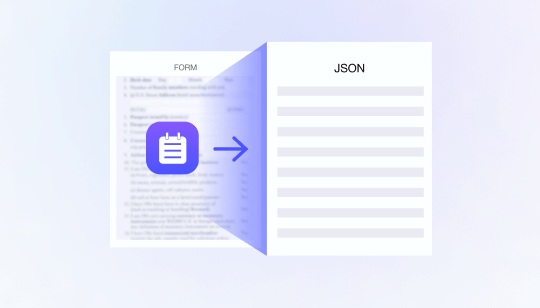
Proof of address verification is a critical part of digital KYC, especially for financial services, lending, payments, insurance, telecom, and other regulated digital businesses. While identity document verification confirms who a customer is, proof of address verification helps confirm where the customer resides and whether the declared residential information is consistent, valid, and usable for compliance or risk assessment.
Traditionally, proof of address checks rely heavily on manual review. Users upload a utility bill, bank statement, tax document, telecom bill, or government-issued residence certificate, and operations teams manually check the name, address, document date, issuer, and format. This process is slow, inconsistent, and difficult to scale. As digital onboarding volumes grow, manual address verification can become a major bottleneck in KYC workflows.
Automating proof of address verification allows businesses to accelerate onboarding, reduce review costs, and improve risk control without compromising compliance quality.
What Is Proof of Address Verification?
Proof of address verification is the process of confirming that a customer’s submitted address document is authentic, recent, and consistent with the information provided during onboarding.
A valid proof of address document usually needs to meet several requirements:
- It should contain the customer’s full name.
- It should show a residential address.
- It should come from an accepted issuer, such as a bank, utility company, government agency, telecom provider, or insurance company.
- It should be issued within an acceptable time window, often within the last three or six months.
- It should not show signs of tampering, forgery, or image manipulation.
In digital KYC workflows, proof of address verification is commonly used together with identity document OCR, face verification, liveness detection, device risk analysis, and risk-based decisioning.
Why Manual Address Verification Creates Friction
Manual proof of address review creates several operational challenges.
First, document formats vary significantly across countries, issuers, and languages. A bank statement in Indonesia may look very different from a utility bill in Mexico or a residence certificate in the UAE. Reviewers must understand different layouts, date formats, address structures, and issuer names.
Second, address documents often contain complex unstructured text. Unlike national ID cards or passports, proof of address documents may include tables, billing sections, account numbers, service addresses, mailing addresses, transaction details, and disclaimers. Extracting the correct name and address fields manually is time-consuming.
Third, fraud risks are increasing. Users may submit edited PDFs, modified screenshots, reused bills, fake templates, or documents that belong to another person. Manual reviewers may miss subtle signs of manipulation, especially under high review pressure.
Finally, manual review does not scale well. As onboarding volume increases, businesses either accept slower processing times or expand review teams. Both options affect conversion, cost, and user experience.
How Automated Proof of Address Verification Works
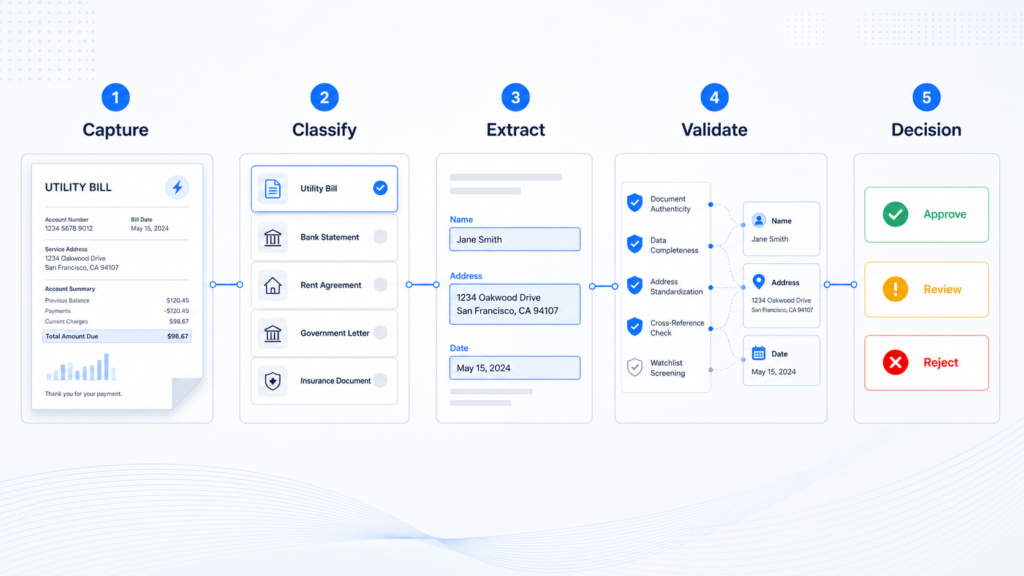
An automated proof of address verification workflow typically includes five key steps.
1. Document Capture and Quality Check
The process begins when the user uploads or captures a proof of address document. The system checks whether the image or PDF is clear enough for analysis. It may evaluate blur, glare, cropping, resolution, orientation, and completeness.
Low-quality submissions can be rejected immediately or routed to re-capture. This improves downstream OCR accuracy and reduces unnecessary manual review.
2. Document Type Classification
Next, the system classifies the document type. For example, it may identify whether the file is a utility bill, bank statement, telecom bill, tax notice, insurance document, or government-issued certificate.
Document classification is important because different document types have different validation rules. A utility bill may require an issuer name, billing date, service address, and customer name. A bank statement may require account holder name, statement date, and address block. A government certificate may require official seals, document numbers, or issuing authority information.
3. OCR Field Extraction
After classification, OCR extracts key information from the document. Common fields include:
- Full name
- Residential address
- Document date
- Issuer name
- Account or reference number
- Country or region
- Postal code
- Document title
For proof of address documents, OCR must handle complex layouts, multi-line addresses, mixed languages, and non-standard formatting. This requires more than basic text recognition. The system must understand document structure and identify which text belongs to the customer identity and address fields.
4. Field Validation and Consistency Check
Once the fields are extracted, the system validates whether they meet business and compliance rules.
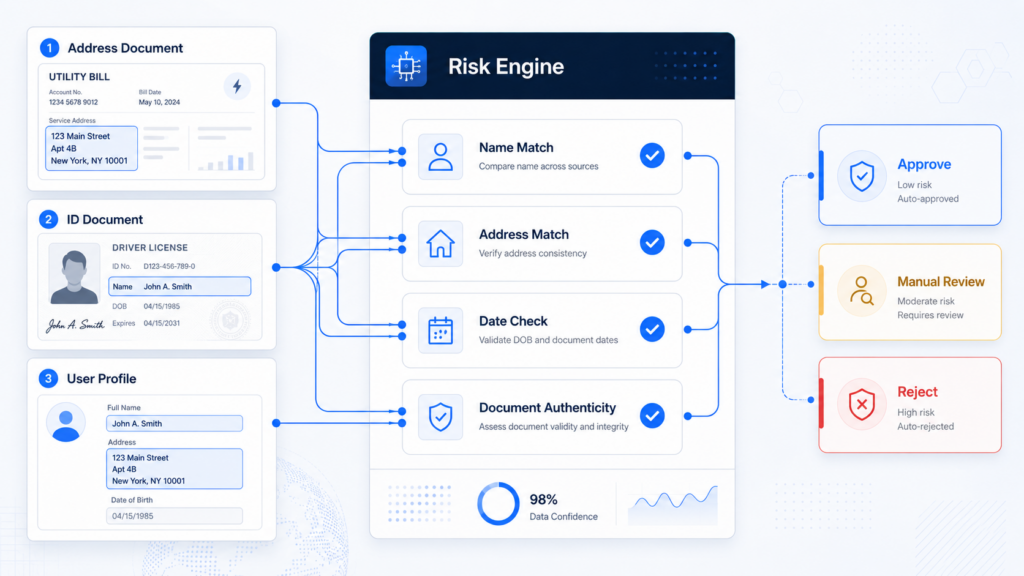
For example, the document date can be checked against the accepted validity window. The extracted name can be compared with the name from the identity document or user profile. The address can be compared with the address entered during onboarding. The country, city, postal code, and address format can also be checked for consistency.
This step helps detect common issues such as:
- Name mismatch
- Expired address document
- Incomplete address
- Different mailing and residential address
- Address entered by user does not match uploaded document
- Document issued in an unsupported country
- Unaccepted document type
Cross-field validation is especially important because many fraudulent or invalid documents may pass a simple OCR extraction check but fail when compared against identity, address, date, and issuer rules.
5. Authenticity and Tampering Detection
Automated systems can also assess whether the submitted document appears authentic. This may include detecting image manipulation, copied templates, suspicious fonts, inconsistent spacing, altered date fields, pasted address blocks, screenshot submissions, or repeated document patterns.
For digital files such as PDFs or screenshots, the system may also evaluate metadata, image layers, compression traces, and visual inconsistencies. For captured documents, it may check whether the document appears to be a real physical document or a recaptured image from another screen.
This layer helps prevent fraudsters from passing KYC with edited or fabricated proof of address documents.
Integrating Proof of Address Verification into Digital KYC
To create an efficient digital KYC workflow, proof of address verification should not operate as a standalone check. It should be integrated with identity verification and risk decisioning.
A typical workflow may look like this:
- The user submits an identity document.
- OCR extracts identity information.
- Document verification checks authenticity and validity.
- Face verification compares the live face with the ID portrait.
- Liveness detection confirms the user is physically present.
- The user submits a proof of address document when required.
- Address OCR extracts name, address, issuer, and date.
- Cross-field validation compares address data with the user profile and identity document.
- The risk engine decides whether to approve, reject, or route the case to manual review.
This approach allows businesses to apply address verification dynamically. Low-risk users may complete onboarding with fewer checks, while higher-risk users, users from specific markets, or users applying for regulated products may be asked to provide additional address evidence.
Benefits of Automated Proof of Address Verification
Automated proof of address verification delivers measurable benefits across compliance, operations, and customer experience.
First, it improves onboarding efficiency. Users can receive faster decisions instead of waiting hours or days for manual review.
Second, it reduces operational costs. Manual reviewers can focus on edge cases and high-risk applications instead of reviewing every address document.
Third, it improves consistency. Automated rules apply the same validation standards across markets, teams, and review shifts.
Fourth, it strengthens fraud detection. The system can analyze document authenticity, field consistency, and risk signals at scale.
Finally, it supports better compliance governance. Businesses can maintain structured records of extracted fields, validation results, decision logic, and audit trails.
How FinAuth Supports Automated Address Verification
FinAuth helps digital businesses automate proof of address verification as part of a broader eKYC and risk-based onboarding workflow. By combining OCR, document analysis, cross-field validation, face verification, liveness detection, device risk, and configurable risk rules, FinAuth enables businesses to verify customer identity and address information with greater speed and accuracy.
For businesses operating across multiple markets, FinAuth can support flexible verification policies based on document type, country, user segment, product risk, and compliance requirements. This allows organizations to balance security, conversion, and operational efficiency in one unified digital KYC workflow.
Conclusion
Proof of address verification is no longer just a manual compliance step. In modern digital KYC workflows, it is an important risk control layer that helps confirm customer residence, detect document inconsistencies, and support regulatory requirements.
By automating document capture, classification, OCR extraction, field validation, authenticity checks, and risk-based decisioning, businesses can reduce onboarding friction while improving verification quality.
For digital platforms that need scalable, secure, and compliant onboarding, automated proof of address verification is becoming a core capability of next-generation KYC infrastructure.