Digital onboarding allows customers to open accounts, apply for loans, activate wallets, or access online services without visiting a physical branch. Instead of face-to-face checks, businesses verify identity remotely through electronic Know Your Customer, or eKYC.
A secure onboarding journey does more than collect an ID image and a selfie. It combines document verification, biometric matching, liveness detection, device intelligence, behavioral analysis, and risk-based decisioning. The goal is to make onboarding fast for legitimate users while stopping identity fraud, document manipulation, deepfakes, account farms, and other high-risk activity.
This guide explains how a modern eKYC process works, step by step.
Step 1: Start the Onboarding Session
The process begins when a user registers for a service or applies for a product. The user may provide basic information such as name, date of birth, phone number, email address, or residential address.
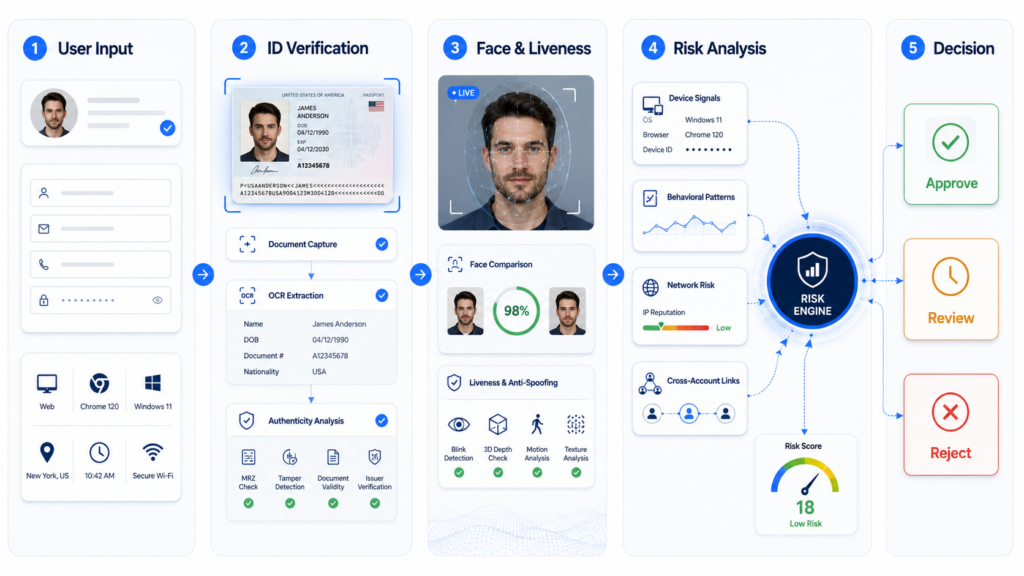
At the same time, the platform collects session signals, including device type, operating system, IP address, browser or app environment, network configuration, language, and time zone.
These signals establish the context of the application. A higher-risk journey may involve an emulator, virtual machine, proxy, VPN, repeated registrations, or conflicting device and identity information.
The purpose is to create an initial risk profile that guides the rest of the verification flow.
Step 2: Capture an Identity Document
The user is asked to capture an accepted identity document, such as a national ID card, passport, residence permit, or driver’s license.
Before submission, the system checks whether the image is suitable for verification. It may evaluate blur, glare, cropping, low resolution, obstruction, poor lighting, or an unsuitable angle. When quality is insufficient, the user should receive clear instructions and be asked to recapture the document.
The capture layer should also identify screenshots, screen displays, photocopies, and re-photographed documents. These may indicate fraud or weak evidence quality.
Document capture is therefore not merely a file-upload step. It is the first visual security control in the onboarding process.
Step 3: Extract Identity Data with OCR
After the image passes quality checks, optical character recognition extracts key fields such as name, date of birth, document number, nationality, expiry date, address, and machine-readable zone data.
The information is converted into structured data for downstream verification and compliance workflows. This reduces manual input, shortens completion time, and lowers the risk of typing errors.
The system should also validate the extracted data. The document should not be expired, and machine-readable zone data should align with the visible fields.
Where required, the data may be compared with authoritative sources, internal customer records, sanctions lists, or other compliance databases.
OCR answers, “What information is on the document?” It does not yet prove that the document is genuine.
Step 4: Verify Document Authenticity
Document authenticity analysis examines whether the submitted credential has been altered, fabricated, copied, or recaptured.
The system may look for editing traces, inconsistent fonts, image splicing, replaced portrait photos, altered text fields, screenshot patterns, print artifacts, abnormal compression, or inconsistent lighting.
Fraudsters can use image-editing software and generative AI to produce documents that look convincing to the human eye. A secure platform should therefore evaluate the document as a whole rather than depend on a single visual rule.
Multiple signals are combined to classify the document as authentic, suspicious, or unsuitable for automated approval. Suspicious cases can be routed to additional checks or manual review.
Step 5: Perform Face Matching
The user then captures a selfie or short video. The live biometric image is compared with the portrait on the identity document through one-to-one face matching.
The system returns a similarity score or confidence level indicating whether the applicant is likely to be the legitimate document holder.
The platform may also check face visibility, pose, lighting, occlusion, and camera quality. Poor input should trigger guided recapture rather than immediate rejection.
Face matching alone is not enough. A fraudster may present a printed photograph, replayed video, deepfake, mask, or injected camera stream. This is why liveness detection must be part of the same workflow.
Step 6: Confirm Liveness and Block Spoofing
Liveness detection determines whether the biometric sample comes from a real person who is physically present during the session.
Passive liveness operates in the background without requiring specific actions. Active liveness may ask the user to blink, turn their head, or follow an on-screen instruction.
A secure solution should defend against printed photos, screen replays, 2D and 3D masks, prerecorded videos, deepfakes, AI-generated faces, virtual cameras, and manipulated camera streams.
FinAuth combines edge- and cloud-based liveness detection with device and session analysis. This allows the platform to assess both the biometric content and the technical path through which it is submitted.
The objective is strong spoofing protection without adding unnecessary steps for legitimate users.
Step 7: Evaluate Device and Behavioral Risk
Organized fraud networks often reuse the same device, IP address, phone number, document template, or behavior pattern across multiple accounts.
Device intelligence can detect emulators, virtual machines, proxies, VPNs, suspicious IP reputation, abnormal device settings, and repeated account creation from the same environment.
Behavioral analysis adds another layer by evaluating input rhythm, touch patterns, navigation flow, and repeated registration behavior.
Together, these controls can help expose multi-account abuse, mule account creation, synthetic identities, device farms, promotion abuse, and account takeover attempts.
This shifts verification from checking one applicant in isolation to understanding the wider risk context around the application.
Step 8: Make a Risk-Based Decision
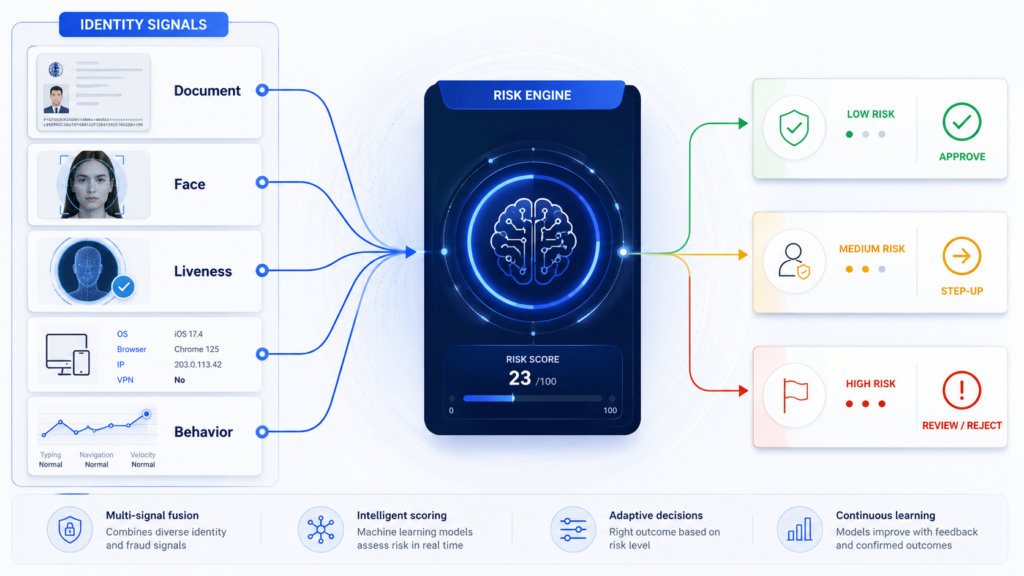
All results are sent to a risk engine. Instead of relying on a single pass-or-fail check, the engine combines document, biometric, device, session, and behavioral signals into one decision.
A typical policy may classify applications into four levels:
- Low risk: Approve automatically.
- Medium risk: Request an additional verification step.
- High risk: Route to manual review.
- Very high risk: Reject or block.
Risk-based decisioning allows legitimate users to complete onboarding quickly while suspicious users face stronger controls.
Policies can vary by country, product, customer segment, transaction value, or regulatory requirement. A wallet may allow basic registration with a lighter process and require step-up verification before high-value transactions.
Step 9: Retain Evidence for Audit and Compliance
A secure eKYC system should record captured evidence, extracted data, risk signals, decision outcomes, timestamps, and policy actions. These records support compliance reviews, fraud investigations, disputes, and model governance.
Businesses should also define data encryption, access control, retention periods, and regional data-handling requirements. Depending on operational needs, the platform may be deployed in the cloud, in a private environment, at the edge, or through a hybrid architecture.
A complete audit trail makes decisions more explainable and helps teams apply policies consistently.
Building Secure Onboarding Without Unnecessary Friction
Digital onboarding is no longer a simple document-upload process. It is a layered identity and risk workflow.
The strongest eKYC journeys combine document capture, OCR, authenticity analysis, face matching, liveness detection, device intelligence, behavioral analysis, and policy-based decisioning. Each layer addresses a different attack surface.
FinAuth is a next-generation eKYC identity verification platform powered by advanced Large Visual Models. It brings together document verification, face verification, dual-engine liveness detection, device and session risk, behavioral analysis, and configurable decisioning. With support for more than 10,000 document types across over 200 countries, it helps banks, payment providers, lenders, insurers, mobility platforms, and online businesses build secure digital onboarding experiences.
The goal is not to add more verification steps. It is to apply the right control to the right user at the right time.